In Short: How does CI / CD actually work in Microsoft Fabric ?
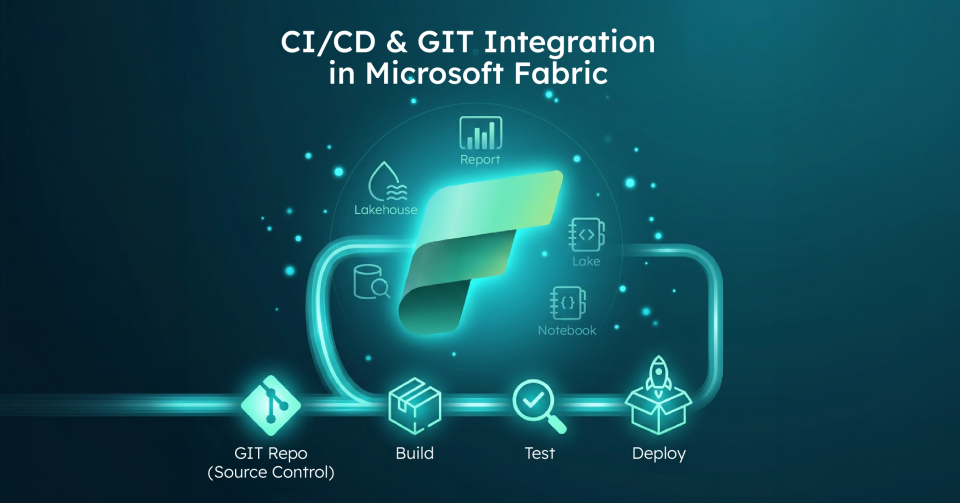
Microsoft Fabric supports application lifecycle management(ALM) using two primary tools:
1. Git integration(source control): Connect a workspace to a Git repo(Azure Repos or GitHub) to commit change items to Git and pull updates back.It is a workspace - level integration designed for versioning and collaboration. 2. Deployment pipelines(release management): Promote content between Development, Test, and Production stages by cloning items while preserving relationships and applying deployment rules.
Fabric positions these under its lifecycle management tooling: standardized collaboration, continuous updates, and faster releases across the product lifecycle.
Why is CI / CD in analytics challenging ?
Most organizations don’t fail at analytics because they can’t build pipelines; they fail because they can’t reliably promote change.Standard challenges include:
- Dev changes breaking Prod reports.
- Environment - specific connections getting overwritten.
- Multiple authors creating competing semantic models.
- Hotfixes appearing in Prod that never make it back to Dev.
Fabric’s ALM approach reduces this friction by providing Git for control and traceability, and pipelines for promotion and environment rules.
How does Git integration work in Microsoft Fabric ?
What does "Git-Connected" mean in Fabric ?
Fabric Git integration connects a workspace to a repo, branch, and folder: essentially making the workspace the unit of version control for supported items.It is designed to let teams back up work, collaborate with branches, revert to previous versions, and apply familiar source control practices to Fabric items.
What is the core day - to - day Git workflow in Fabric ?
The standard process involves connecting the workspace, developing items, and syncing changes: 1. Connect Workspace: A workspace admin connects the environment to a repo and branch. 2. Develop: Teams create or edit supported Fabric items directly in the workspace. 3. Commit Changes: Workspace changes are "committed" into the connected repo. 4. Update from Git: Changes are "pulled" from Git into the workspace: ideal for PR - based workflows or syncing across contributors. 5. Branching: Teams manage branches to isolate work and then merge via standard Git workflows.
Where do implementations usually get stuck with permissions ?
Fabric separates workspace roles and Git permissions.For example, connecting or switching branches typically requires workspace Admin role.Committing or updating requires workspace write permissions and: depending on tenant settings: item ownership or build permissions.Git - side permissions also differ between Azure Repos and GitHub and may require specific policy alignment for direct commits.
How do deployment pipelines work in Microsoft Fabric ?
What do Fabric pipelines actually do?
Deployment pipelines provide staged environments: typically Dev, Test, and Production: and a deployment action that copies content from one stage to the next.During deployment, Fabric copies items, keeps connections intact, and applies deployment rules you configure in the target stage.
Why are rules the "Don’t Break Prod" mechanism ?
Rules prevent “deployment overwrites reality.” A classic example is a Dev semantic model pointing to sample data while Prod must point to the production database: deployment rules let you keep those environment-specific settings intact.
What is the practical pipeline pattern for Fabric ?
- Development stage: Build and iterate fast.
- Test stage: Validate data correctness, performance, access, and refresh behavior.
- Production stage: Publish stable, governed content for business consumption.
Why is CI / CD in Fabric a combination of Git and Pipelines ?
Fabric’s best - practice guidance frames it clearly: Git integration is for source control, while Deployment pipelines are for release.Use both to build a reliable lifecycle from creation to testing to production publishing.
A common high - confidence model is using Git to track what changed and why (history, PRs, reviews) and using pipelines to control what gets promoted and what stays environment-specific(rules).
Can you trigger Fabric CI / CD from Azure DevOps or GitHub Actions ?
Yes, pipelines can be triggered manually or automated via APIs.External CI / CD systems like Azure DevOps or GitHub Actions can be used to automate build and deployment workflows.Fabric’s lifecycle management documentation also includes guidance for automating ALM workflows using these APIs.
Who is this lifecycle management guide for?
Fabric CI / CD becomes valuable when you have:
- Multiple developers contributing to shared analytics assets.
- Regulated environments requiring traceability.
- Multiple workspaces(Dev, Test, Prod).
- A need for repeatable releases instead of "one-off" publishing.
What is the strategic point most organizations miss ?
Fabric gives you the tools, but your success still depends on your operating model.You must decide who owns semantic models, what the branching strategy is, and what qualifies as "ready for Prod." Without these decisions, Git and pipelines just move chaos faster.
Why work with Solv Systems on Fabric CI / CD ?
At Solv Systems, we implement Fabric lifecycle management as a repeatable product release process, not just a set of clicks.
Strategy Before Tooling
We define your environment strategy, branching and merge policies, and the ownership model for shared assets.
CI / CD That Matches Real Analytics Work
We build workflows that align with how Fabric works: workspace - level integration, deployment pipelines with protective rules, and automation hooks where they provide the most value.
Governance That Prevents "Noisy Releases"
We add guardrails including controlled promotion gates, validated dependency promotion, and predictable rollbacks via Git history.