In Short: What actually is Microsoft Fabric Data Factory ?
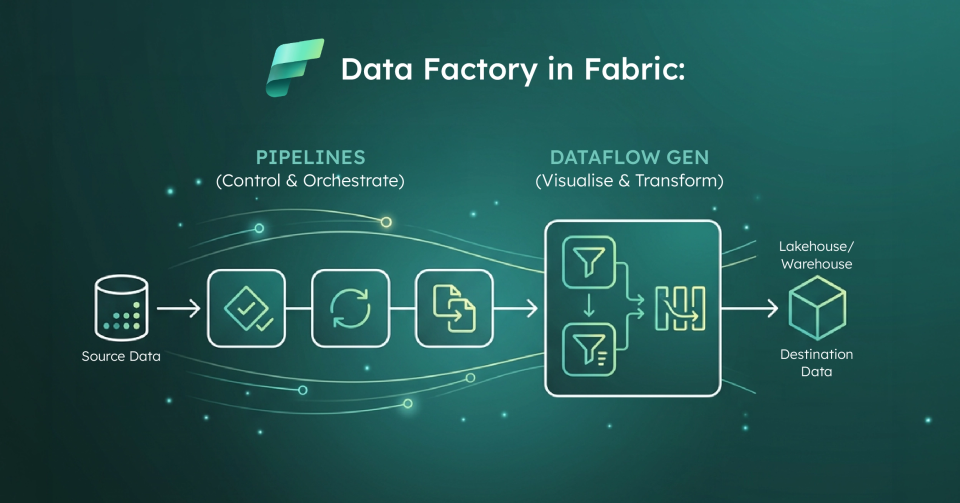
Data Factory in Microsoft Fabric is the data integration layer that provides cloud - scale data movement and data transformation services for ETL and orchestration inside Fabric.In practice, most teams use it through two primary building blocks:
- Pipelines: Orchestration workflows that group activities(copy, transform, control flow) and run on - demand, on schedules, or via event triggers.
- Dataflow Gen2: A Power Query: based, low - code ETL experience for ingesting from many sources, applying transformations, and loading to Fabric destinations like Lakehouse and Warehouse.
The real story is that Fabric Data Factory is Microsoft’s attempt to make ingestion, transformation, and orchestration feel like one product experience instead of a stitched - together toolchain.
Which data challenges is Fabric Data Factory designed to solve ?
Most organizations don’t struggle because they can’t connect to data; they struggle because they can’t repeatably move and shape data without creating fragility.Common issues include manual refresh processes, "one-off" ETL logic trapped in personal workspaces, and inconsistent transformations.
Fabric Data Factory targets this by offering a governed place to build repeatable pipelines and standardized transformations.
What are pipelines in Microsoft Fabric Data Factory ?
A pipeline is a logical grouping of activities that together perform a task: so you deploy and schedule the workflow as a unit rather than managing each step separately.
What do Fabric pipelines typically do?
Fabric pipelines commonly orchestrate end - to - end workflows including:
- Ingestion: Moving data from sources via the Copy activity.
- Validation: Shaping and checking data quality.
- Control Flow: Running logic using conditions, loops, and error handling.
- Downstream Triggers: Kicking off a Dataflow Gen2, notebook, or notifying teams.
How do pipelines run in Fabric ?
Pipelines can be executed on - demand, on a schedule, or via event - based triggers.Microsoft categorizes activities into three main buckets: data movement, data transformation, and control flow.
What is Dataflow Gen2 and why do teams use it ?
Dataflow Gen2 is a cloud - based, low - code ETL tool built on the familiar Power Query experience.It is designed to connect to many sources, apply transformations, and load to multiple destinations including Lakehouse and Warehouse.
Teams lean on Dataflow Gen2 because it provides a low - code surface that BI and analytics teams can own, it supports multiple Fabric destinations, and it integrates tightly with pipelines for larger workflows.
How do pipelines and Dataflow Gen2 work together ?
Fabric encourages a specific pattern: Pipelines handle the orchestration(the when, why, and how of the workflow), while Dataflow Gen2 handles the transformations(the how of the data shaping).The outputs then land in Fabric destinations for downstream analytics.
What are the common limitations of Fabric Data Factory ?
While powerful, the platform is still evolving.Treating Microsoft’s limitations list as required reading is critical before any production rollout.
What are the current pipeline limitations ?
Some notable constraints include:
- No Tumbling Window Triggers: A common pattern in older ADF that is not yet natively supported.
- Credential Storage: Connectors don't currently support OAuth and Azure Key Vault for pipelines in older patterns.
- Managed System Identity(MSI): Support is currently limited primarily to Azure Blob Storage, with broader support coming soon.
- Missing Activities: Mapping Data Flow and SSIS integration runtime are not yet available.
What are the practical scale boundaries for pipelines ?
Microsoft publishes workspace and pipeline limits that you must design around, including the maximum number of pipelines per workspace and concurrency limits.These matter most when trying to centralize all ingestion into "mega-pipelines."
What are the Dataflow Gen2 "gotchas" ?
Common issues we see in projects include:
- Lakehouse Naming Rules: Spaces and special characters are not supported in column or table names.
- Unsupported Types: Duration and binary columns are not supported for Lakehouse destinations.
- Gateway Requirements: You must maintain a supported gateway version(one of the last six releases).
- Refresh Limits: Token refresh limitations can cause refreshes longer than one hour to fail.
- Validation Timeouts: There is a 10 - minute publish and validation limit per query.
Who is Fabric Data Factory for?
It is a strong fit when you want a standard ingestion and transformation approach that is visible, schedulable, and monitorable.It provides a clear path from raw ingestion to curated datasets, especially for organizations trying to reduce "ETL sprawl."
What is the strategic point most organizations miss ?
Success comes down to the operating model more than the tool.You must define who owns transformations, how to separate reusable patterns from one - off logic, and how to design around known platform limits.
Why work with Solv Systems on Fabric Data Factory ?
At Solv Systems, we implement Fabric Data Factory as a repeatable ingestion product, not just a collection of pipelines.
Strategy Before Build
We start with business outcomes and data SLAs to determine the right split between pipelines and Gen2 transformations.
Patterns That Scale
We design modular pipeline patterns that respect platform limits and avoid the fragility of "mega-pipelines."
Proactive Engineering
We proactively engineer around common Gen2 constraints like naming, gateway refresh behavior, and publish limits so you don't hit blockers in production.
Governance and Adoption
We establish clear ownership of transformations so your data foundation becomes reusable across the organization.